Colegia: The Powerful Digital Education Hub Simplifying School Life
A practical guide to the Colegia login, Colegia ID, student tools, parent access, school applications, communication features, and everyday learning experience.

Modern education increasingly depends on digital tools, but managing several applications, passwords, assignments, messages, and school resources can quickly become complicated. Colegia makes this process easier by bringing key educational services together in one central digital environment.
Students can use the platform to reach learning applications, classroom information, assignments, school announcements, and other academic resources. Teachers and school staff can communicate with their learning communities, while parents and guardians can receive greater visibility into their children’s education.
Instead of treating digital learning as a collection of unrelated websites, Colegia works as a central education hub. This approach can make school technology easier to navigate for students, families, educators, and administrators.
This article explains what Colegia is, how the platform works, and how students, parents, teachers, and schools can use it for digital learning. It covers the Colegia login process, Colegia ID, educational applications, assignments, virtual classrooms, parent access, communication tools, common login problems, and the main benefits of using Colegia as a centralized education platform.
What Is Colegia?
Colegia, commonly styled as Colēgia, is a digital education platform created to help learning communities connect, cooperate, and collaborate.
It functions as a centralized environment where schools can provide access to educational applications, communication features, learning resources, and other services.
How the Colegia Platform Works
The exact Colegia experience can vary according to the school or organization using it. Once signed in, a student may see applications and resources assigned by their institution.
Instead of remembering separate entry points for every school service, students can begin with their Colegia dashboard and move to the tools they need.
This makes the platform particularly useful for schools that rely on multiple digital services.
Who Can Use Colegia?
Colegia is designed for several groups within a school community.
Students can access academic resources and school applications. Teachers and staff can use communication and instructional tools. Parents and guardians may access information related to their children, depending on what their school enables.
Colegia Login Explained
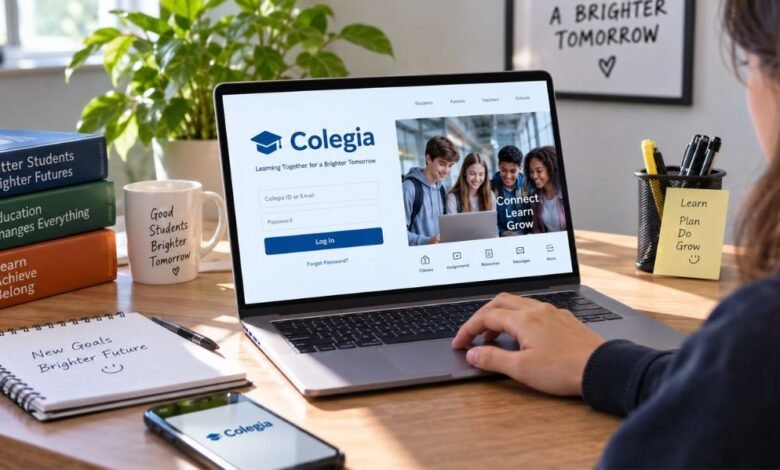
The Colegia login is the starting point for accessing the platform.
Students and staff generally sign in using their Colegia ID or school-issued email credentials. Parents and guardians use a separate login process to access the appropriate family features.
Colegia Student and Staff Login
When students or school employees reach the login screen, they enter their Colegia ID or email.
After authentication, the available dashboard and applications depend on the user’s school and account permissions.
Why the Correct Account Matters
Using the correct school-issued credentials matters because the Colegia account identifies the user and determines which educational applications and resources appear.
If you enter the wrong email or credentials, access may fail, or the expected school tools may not appear.
What Is a Colegia ID?
A Colegia ID is an important part of the student login system. For students, the platform explains that the Colegia ID is their student email address.
Students who don’t remember their ID may be able to find it using the platform’s student lookup feature.
Finding a Colegia ID
The lookup process may require information such as the student’s county and student identification number.
Because schools can have different procedures, students should follow the instructions supplied by their own institution when retrieving account details.
Keep Login Information Private
Students should never share passwords, student identification numbers, security-question answers, or other private account information publicly.
School accounts often contain educational and personal data, making responsible password management especially important.
Main Features of Colegia
One reason Colegia is useful is that it combines several types of educational activity within one ecosystem.
Educational Applications
Colegia can act as a gateway to school-approved educational applications.
Depending on the institution, students may find tools for classroom learning, assessments, assignments, academic practice, email, calendars, grades, attendance, or related services.
Assignments and Class Information
Students may be able to view assignments, classroom bulletins, and other academic information from within the Colegia environment.
A central dashboard can reduce the need to search across several unrelated services.
Virtual Classroom Access
Colegia also supports online learning by providing access to virtual classroom experiences.
This can help schools provide remote instruction, hybrid learning, supplementary online classes, or digital educational activities.
School News and Announcements
Important communication is another major function of the platform.
Students and families can receive school updates, announcements, messages, and activity information.
Keeping communication alongside academic tools can make it easier for users to follow what is happening at school.
Colegia for Parents and Guardians
Colegia is not limited to students.
Parents and guardians can create or use dedicated accounts where supported by their school. A parent account may link to a student’s profile so the family can follow relevant academic information and communicate more effectively with the school.
Monitoring Student Progress
Depending on the institution’s configuration, parents may be able to review information such as grades, classes, assignments, academic progress, testing information, or school notices.
Feature availability depends on the school.
Better School-Family Communication
Digital communication can reduce situations where an important school notice is lost or overlooked.
A central parent portal gives schools another structured channel for sharing information with families.
Benefits of Using Colegia
Colegia’s biggest advantage is convenience.
Students often use numerous digital products during a school day. Managing separate websites and login processes can become confusing, particularly for younger learners.
Colegia attempts to simplify this experience by giving users a central starting point.
One Central Education Dashboard
Instead of treating every application as an isolated service, Colegia groups educational tools within a broader digital school environment.
This improves organization and makes frequently used resources easier to find.
Useful for Different Learning Models
Colegia can support traditional classroom education as well as virtual and hybrid learning.
This flexibility matters because modern schools increasingly combine physical classrooms with online resources.
Common Colegia Login Problems
Like any online platform, users may occasionally experience access problems.
Forgotten Password
If a user has forgotten their password, they should use the official password-recovery process provided through Colegia or follow instructions from their school.
Colegia ID Not Remembered
Students who cannot remember their Colegia ID may be able to use the student lookup feature.
Applications Are Missing
If a student signs in successfully but cannot see an expected application, the issue may relate to account permissions or the school’s configuration.
In that situation, contacting the school or the appropriate technical support team is usually the safest next step.
Avoid Unofficial Login Assistance
Users should avoid giving passwords or student credentials to unknown websites or individuals claiming that they can fix a Colegia account.
Handle account problems through the school or authorized platform support.
Is Colegia Safe to Use?
Colegia presents itself as a secure education platform intended for learning communities.
However, users also have an important role in account security. Use strong passwords, keep credentials private, and sign out when accessing school accounts on shared devices.
Parents should also teach younger students not to share school login information with friends or strangers.
Why Platforms Like Colegia Matter
Education technology has moved beyond simply placing textbooks online.
Students now use communication systems, learning management tools, assessment platforms, virtual classrooms, calendars, gradebooks, and specialized educational applications.
A centralized system such as Colegia attempts to organize these tools into a more manageable digital environment.
When a school implements it effectively, this type of platform can make accessing resources easier for students while helping teachers, administrators, and families stay connected.
Frequently Asked Questions About Colegia
What is Colegia used for?
Colegia is a digital education platform that can provide access to school applications, assignments, classroom resources, virtual learning, communications, news, and other educational services.
How do students log in to Colegia?
Students generally sign in using their Colegia ID or school-issued email credentials. Exact login procedures can differ between schools.
What is a Colegia ID?
A Colegia ID identifies a student on the platform. For students, Colegia describes the ID as the student’s school-related email address used for accessing applications and resources.
Can parents use Colegia?
Yes. Colegia supports parent and guardian accounts. Available features depend on the student’s school and how the institution has configured parent access.
What should I do if Colegia is not working?
First, confirm you’re using the correct login information. If the problem involves a forgotten password, missing application, account permissions, or student information, contact the school or authorized Colegia support rather than sharing credentials with unofficial services.
Conclusion
Colegia provides a centralized approach to digital education by connecting students, educators, parents, school applications, communication tools, and academic resources within one platform.
Its greatest value is organization. Instead of forcing students to navigate a collection of disconnected systems, Colegia provides a central place to access many of the services needed during the school day.
For parents, it can provide another way to stay informed about school activity and student progress. For educators and institutions, it offers a structured environment for connecting their digital learning community.
As schools continue using more technology in everyday education, platforms such as Colegia can play an increasingly important role in keeping digital learning accessible, organized, and connected.